UART USB Software: A Practical Guide for Hobbyists and Engineers
Admin · Jul 16, 2026
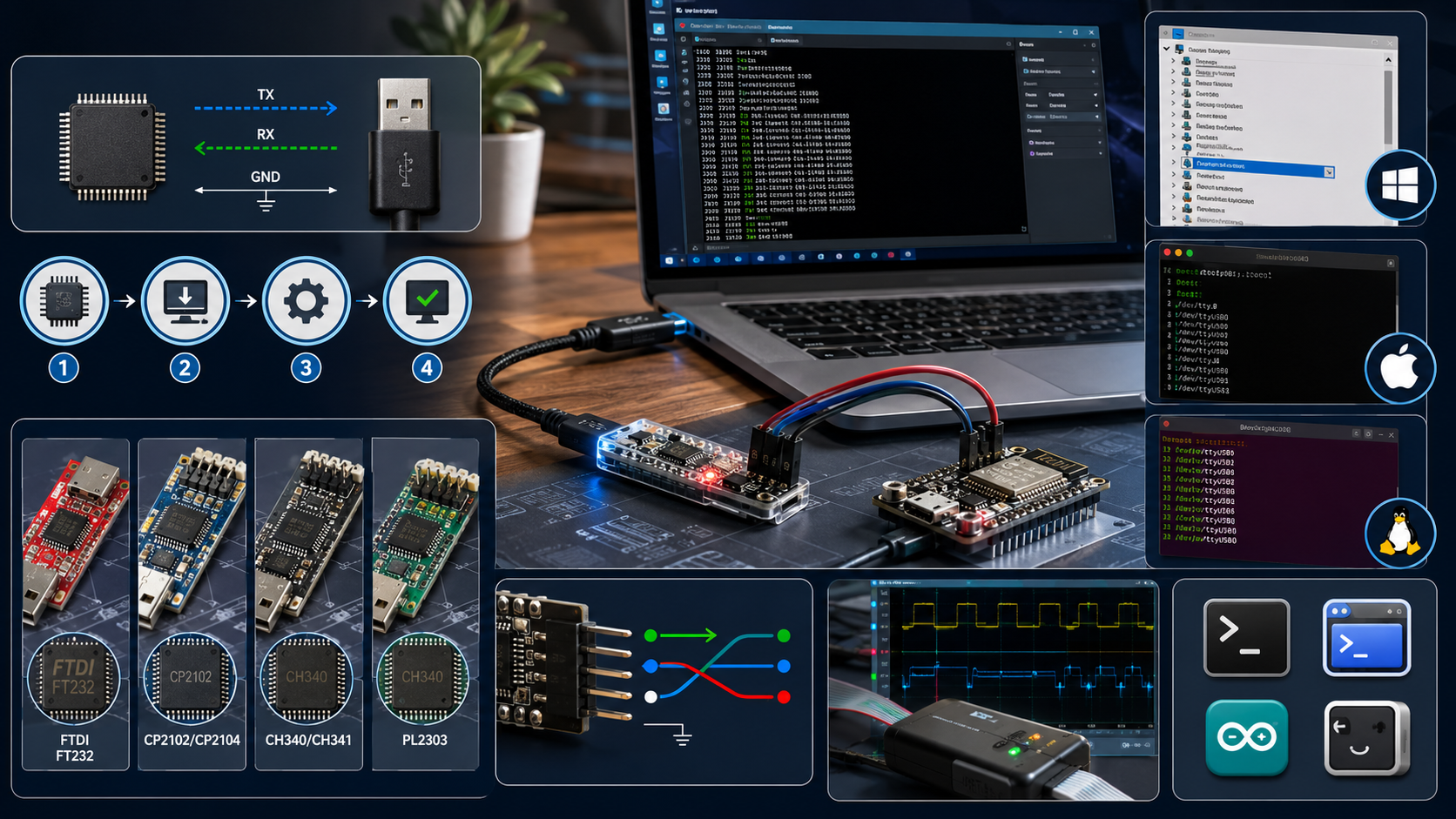
If you’ve ever worked with microcontrollers, single-board computers, or embedded devices, you’ve probably run into UART at some point — usually right when you’re trying to figure out why your device isn’t showing up as a COM port on your computer. UART USB software is the bridge that makes serial communication between old-school UART hardware and a modern USB port actually work. This guide walks through what it does, the drivers you’ll commonly need, and how to troubleshoot the most common headaches.
What UART Actually Is
UART stands for Universal Asynchronous Receiver-Transmitter. It’s one of the oldest and simplest ways for two devices to talk to each other, using just two wires — one to transmit data (TX) and one to receive it (RX) — plus a shared ground. It doesn’t need a clock signal, which is what makes it “asynchronous,” and both sides just need to agree on a baud rate ahead of time.
Modern computers don’t have physical UART/serial ports anymore, though. That’s where UART-to-USB conversion comes in.
Why You Need UART USB Software
Most microcontrollers, Arduino boards, ESP32 modules, and industrial equipment still communicate over UART because it’s simple, reliable, and doesn’t require much processing overhead. Your laptop, on the other hand, only has USB ports. A UART-to-USB adapter (often built around a chip like the FTDI FT232, CP2102, or CH340) handles the physical conversion, but your computer also needs the right software driver installed to recognize that chip and present it as a usable serial port.
Without the correct driver, your computer either won’t recognize the device at all, or it will show up as an “unknown device” in Device Manager, and your serial monitor software won’t be able to connect to it.
Common UART-to-USB Chips and Their Drivers
Chip | Common Uses | Driver Needed |
|---|---|---|
FTDI FT232 | Arduino clones, industrial devices | FTDI VCP driver |
Silicon Labs CP2102/CP2104 | ESP32, ESP8266 boards | Silicon Labs CP210x driver |
CH340/CH341 | Cheap Arduino clones, many dev boards | CH340 driver |
Prolific PL2303 | Older USB-to-serial cables | Prolific driver (varies by chip revision) |
Each of these manufacturers provides its own Virtual COM Port (VCP) driver, which is the actual software that lets your operating system treat the USB connection like a traditional serial port.
How to Set Up UART USB Software Step by Step
1. Identify the Chip on Your Device or Adapter
Check the board or adapter for a visible chip label, or look up the product page if you bought it online. Cheaper clone boards very often use CH340 chips, while more official boards tend to use FTDI or Silicon Labs chips.
2. Download the Correct Driver
Go directly to the manufacturer’s website rather than a random download link, since serial drivers are a common target for outdated or bundled software. FTDI, Silicon Labs, and the CH340 driver are all available as free downloads directly from their official sites.
3. Install and Restart
Most driver installers are straightforward, but a system restart (or at least unplugging and replugging the device) is often necessary before Windows or macOS will recognize the new virtual COM port properly.
4. Confirm the Port Is Recognized
On Windows: Open Device Manager and look under “Ports (COM & LPT).” You should see something like “USB-SERIAL CH340 (COM5).”
On macOS: Open Terminal and run ls /dev/tty.* to see connected serial devices.
On Linux: Run ls /dev/ttyUSB* or ls /dev/ttyACM* depending on the chip.
5. Connect With Serial Monitor Software
Once the port shows up, you can connect using tools like the Arduino IDE’s Serial Monitor, PuTTY, CoolTerm, or a terminal emulator, making sure the baud rate matches what your device expects (9600 and 115200 are the most common defaults).
Common Problems and How to Fix Them
Device shows as “Unknown Device” in Device Manager This almost always means the driver either isn’t installed or installed incorrectly. Uninstall any partial driver install, redownload from the manufacturer, and try again.
Port shows up but no data comes through Double-check the baud rate matches on both ends. A mismatched baud rate is one of the most common reasons for garbled or missing serial data.
TX and RX seem reversed This is a classic wiring mistake. The TX pin on one device needs to connect to the RX pin on the other, not TX to TX. If your data looks completely wrong, this is the first thing to check.
macOS won’t load the driver due to security settings Newer versions of macOS require you to manually allow the driver in System Settings under Privacy & Security after installation, since unsigned kernel extensions are blocked by default.
Multiple devices, but you can’t tell which COM port is which Unplug all devices, plug in just one, and note which port appears. Repeat for each device so you know exactly which physical device maps to which COM port.
Software Tools Worth Knowing
Beyond the driver itself, a few tools make working with UART over USB much easier day to day:
PuTTY (Windows) — a lightweight, reliable terminal for serial connections
CoolTerm (Windows/macOS/Linux) — simple interface, good logging features
Arduino IDE Serial Monitor — built in if you’re already working with Arduino
screen (macOS/Linux terminal command) — quick and dependency-free for basic connections
If you’re documenting pinouts, wiring diagrams, or setup instructions for a project, keeping that documentation clean and organized matters more than people expect, especially when you’re sharing it with a team. A set of Developer Tools can help with formatting code snippets and cleaning up configuration files, while Text Tools are handy for tidying up README files and setup guides before you publish them.
When to Use a Logic Analyzer Instead
If you’ve installed the right driver, confirmed your wiring, and matched your baud rate, but you’re still getting garbage data, the problem might not be software at all. A cheap USB logic analyzer lets you actually see the electrical signal on the TX/RX lines, which is often the fastest way to catch wiring or timing issues that software troubleshooting alone won’t reveal.
Wrapping Up
UART USB software is a small but essential piece of nearly every embedded electronics project. Getting the right driver installed and correctly matched to your specific chip solves the vast majority of connection problems, and from there, it’s mostly a matter of matching baud rates and double-checking your wiring. Once it’s working, UART over USB is a dependable, low-overhead way to debug and communicate with hardware that’s been a staple of electronics projects for decades. For more practical tech guides like this one, visit the Toolsimpli Blog, or explore more tools over at Toolsimpli.
Related posts
Microsoft Malicious Software Removal Tool (MSRT): The 2026 Guide
MSRT is one of those background tools that quietly does its job without asking for attention. If you manage documentation or reports around your system's security checks, the Developer Tools and PDF Tools sections can help you log and format that information cleanly. For more security-related guides, check Read Latest Blogs, browse Image Tools if you need to capture and edit screenshots of scan results, or visit the FAQs page for quick answers.

Recovery Home Management Software: What It Is and Why Your Facility Needs It
At its core, this type of software centralizes everything related to running a recovery home. Instead of keeping resident files in one place, payment records in another, and compliance documents in a folder on someone’s desktop, everything lives in one system your whole team can access.

Common Account Audit Software Used in Kenya: A Practical Overview
Before naming specific tools, it helps to understand the different categories, since most firms end up using more than one type together.

GFXrobotection AI Software by GFXMaker: A Complete Guide for Creative Professionals
As artificial intelligence continues to evolve, tools like this are becoming an increasingly useful part of the creative process. When used thoughtfully alongside your own skills and creativity, AI can help you work smarter, stay organized, and produce professional-quality designs more efficiently.

WhiteSnow Software: Who They Are and What They Actually Do
WhiteSnow Software is a real, established software consultancy with over a decade in the industry and a genuine product — Axonator — that it has continued to develop and support. Like any vendor, the right move is to verify current details directly with the company, request references, and compare their offering against your specific project needs rather than relying solely on any single source, including this one.