Link Verification Code Text: What It Is and How It Works
Admin · Jul 28, 2026
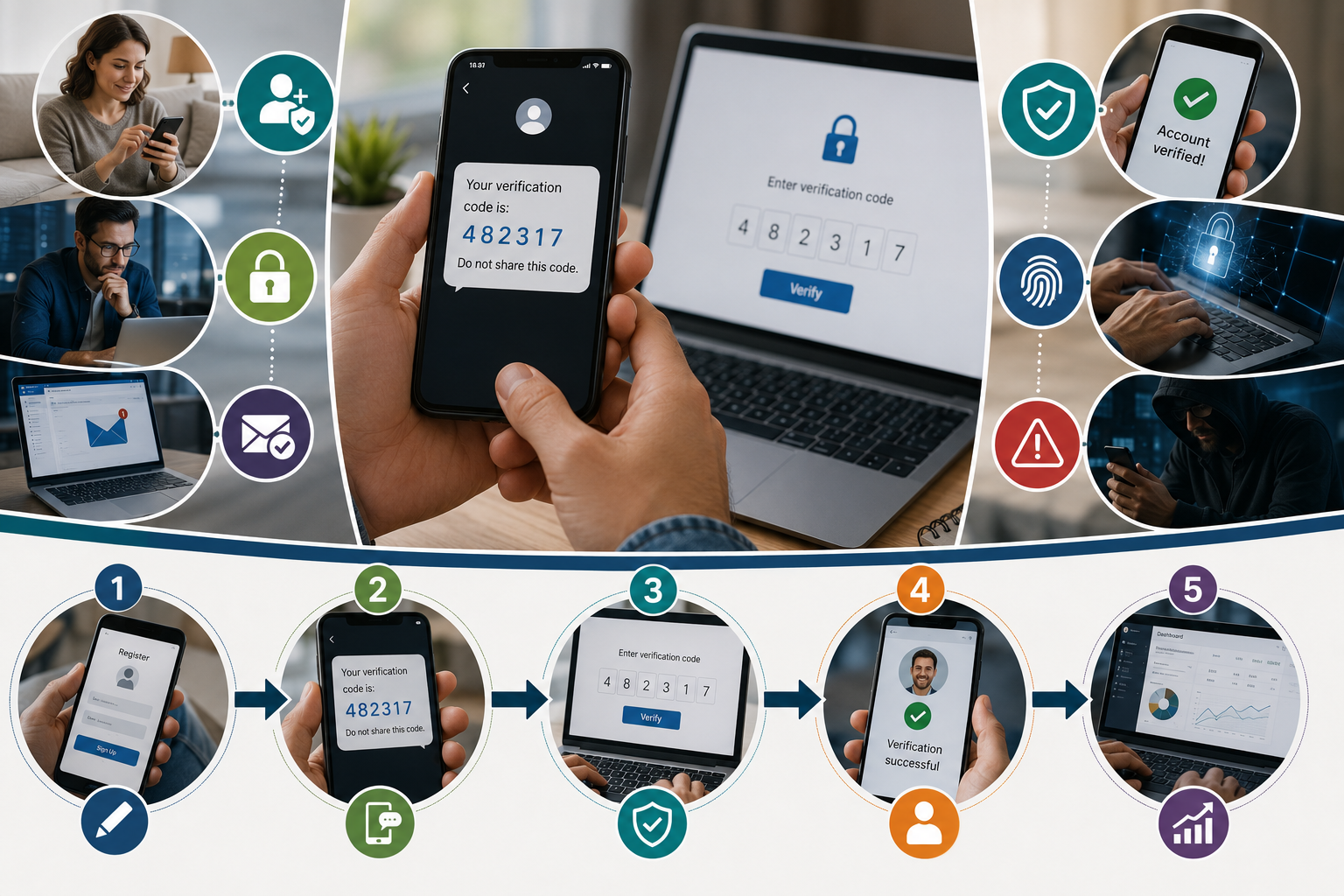
If you have ever signed up for a service and received a text message with a short code or a clickable link, you have run into link verification code text. It is one of the most common ways websites and apps confirm that a phone number, email, or account genuinely belongs to the person using it.
This guide explains what these messages actually contain, why they matter for security, and how to handle them safely.
What Is a Link Verification Code Text?
A link verification code text is a message, usually sent by SMS or email, containing either a short numeric code or a clickable link that confirms ownership of an account, phone number, or email address. Entering the code or clicking the link tells the service that the request came from a real, reachable person rather than an automated bot.
Why Services Send Verification Codes
Confirming a new account signup is legitimate
Adding a second layer of security during login, known as two-factor authentication
Verifying a password reset request actually came from the account owner
Confirming a phone number or email before enabling notifications
How the Process Typically Works
Step | What Happens |
Request | You sign up, log in, or request a password reset |
Send | The service sends a code or link to your phone or email |
Confirm | You enter the code or click the link within a set time window |
Access | The service unlocks the account or completes the action |
Code vs. Link: What Is the Difference?
A numeric code must be typed back into the original app or website manually
A clickable link opens automatically and confirms verification without retyping anything
Codes are generally considered slightly safer since they require you to return to the original site rather than trusting an embedded link
How to Tell If a Verification Text Is Legitimate
Check the sender: Legitimate codes usually come from a recognized short code or the company's official sending number.
Match the request: You should have just requested a signup, login, or reset. An unprompted code is a red flag.
Never share the code: No legitimate company will call or text asking you to read your verification code back to them.
Check the link domain: Hover over or preview the link before tapping, and confirm it matches the company's real domain.
What to Do If You Receive an Unexpected Code
Do not enter the code anywhere or click the link
Change your password on the related account as a precaution
Check your account's recent activity log if one is available
Use a reputable text tool to check message formatting or spot suspicious patterns if you are unsure
Pros and Cons of Verification Codes
Pros | Cons |
Adds a strong layer of account security | Can be delayed if carrier or network issues occur |
Simple for most users to understand and use | Vulnerable if a phone number is compromised or swapped |
Works without needing a separate authentication app | Relies on having phone or email access at all times |
Best Practices for Handling Verification Texts
Enable two-factor authentication wherever it is offered
Keep your recovery phone number and email up to date
Consider an authenticator app for accounts that support it, as a backup to SMS codes
If you manage several accounts, review your about us style profile pages regularly to confirm recovery contact details are current
Common Scams That Abuse Verification Codes
A well-known scam involves someone attempting to log into your real account, which triggers a legitimate verification code to your phone. They then contact you, often pretending to be support staff, and ask you to read the code back to them. Because the code truly did come from the real service, victims are more easily fooled into thinking the request is genuine. The rule to remember is simple: a real company never needs you to read a code back over the phone or in a chat.
Fake support calls asking for a code you just received
Phishing texts that mimic a real company's sender name
Urgent messages claiming your account will be locked unless you confirm immediately
How Businesses Implement This on Their Own Sites
For businesses building signup or login flows, verification codes are usually handled through a dedicated SMS or email provider rather than written from scratch. Development teams commonly test these flows using developer tools to simulate message delivery before launching to real users, which helps catch formatting or delivery issues early.
Set a reasonable expiration window, typically five to ten minutes, so old codes cannot be reused
Limit the number of attempts to enter a code to prevent guessing
Log verification attempts so unusual patterns can be reviewed later
Alternatives to SMS-Based Verification
SMS is convenient but not the only option. Authenticator apps generate codes locally on a device without needing a network connection, which avoids risks tied to phone number theft or carrier-level attacks. Email-based magic links are another alternative, sending a one-time login link instead of a code, though they depend on quick access to an inbox rather than a phone.
Final Verdict
Link verification code text is a routine part of confirming your identity online, and understanding how it works makes it far easier to spot the rare cases where someone is trying to abuse the same system. When in doubt, do not act on a code you did not request, and always verify the sender before typing anything back.
Frequently Asked Questions
What is a link verification code text used for?
It confirms that a phone number, email, or account request genuinely came from the real owner, often as part of signup, login, or password reset.
Is it safe to click a verification link?
It is generally safe if you requested it and the link's domain matches the company's official site. Unexpected links should not be clicked.
What should I do if I get a code I did not request?
Do not enter or share the code, and change your password on the related account as a precaution.
Are verification codes the same as two-factor authentication?
They are closely related. A verification code sent by text is one common form of two-factor authentication.
Is an authenticator app safer than SMS codes?
Generally yes, since authenticator apps are not vulnerable to SIM-swapping or carrier-based attacks the way SMS codes can be.